
I was using the Free Bandwidth Monitor on my Windows XP PC, but once I switched to Vista (64 bit), the 32 bit software ceased to work.
Free Bandwidth Monitor was simple and efficient; after trying out many other softwares, I am now happy with NetWorx – A free, simple, Bandwidth Monitoring and Analysis Tool.
NetWorx does its job fairly well. Reports can be seen on last 24 hours, daily, weekly, monthly and Total. It can also show you custom reports within the dates you specify.
Here is a screen-shot of NetWorx, for more screen-shots click the image.
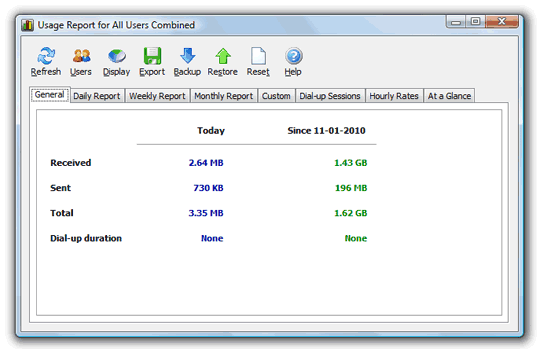 With NetWorx you can –
- Find out and monitor how fast your Internet connection is.
- Find out and monitor how much Internet traffic you consume.
- Verify whether your ISP charges your Internet usage fairly.
- Detect a suspicious network activity on your computer.
- Perform simple network tests such as ping and trace route.
- Be notified about excessive Internet usage.
NetWorx stays as a button near the clock, additional features can be accessed by right click-ing the icon. Its that simple.
Download NetWorx Free – Look to the right sidebar for the download link. In case you need, detailed online help is available here.

I am a WordPress product developer and creator of Image Attributes Pro. I am passionate about solving problems and travelling the world.





Hollaaa,
Big surprise. Million clues completely turns white from being black.
Theme modification in progress – Nice one in footer 🙂
I also did use Bitmeter for BW monitoring which presents data in graphs when I used to have a limited plan. But I don’t need them any more.
And btw, did you get a 64bit Vista OS with your Studio 15? (It’s 32bit for me)
I had opted for the 64 bit OS, our processor is 64 bit rt? Then why not go for a 64 bit OS?
Well, this is not a theme, but a framework, am totally new with frameworks, learning the stuffs. 🙂
Perfect! The one, I’ve been looking for!
I use dw meter for this. It is also a good one i think. Finally you too changed the theme. A complete change! The theme is jet fast. Good Luck Bro.
Thanks dude, speed is the first criteria now, usability second 🙂
Ooops. First I got confused with Copy Blogger’s theme! 😀
Nice theme… and I was not using any Bandwidth stuff tool. Will check this now.. 😉
Thanks dude, a theme change was essential, did it 🙂
I recommend Net Meter to my clients usually. But i must try this one too… This looks so simple and great.
Thanks for the recommendation @Arun.
My pleasure Robin. Simple stuffs are usually awesome 🙂
Cool! great find bro! thanks! i always use a tool like this in linux!
Thanks for dropping by Pubudu, glad it helped 🙂
Hi there .,
actually great program thanks a lot for it 😉
really that program helped me much ,
Good to know 🙂