
FreeMind is my choice of software for Mind Mapping. Its simple, Free and awesome.
How to use FreeMind
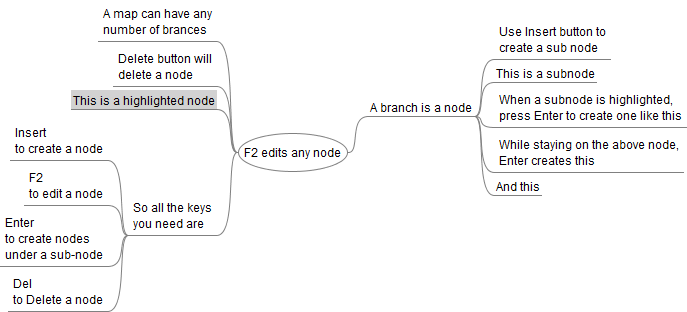
FreeMind is simple. You need to use just 4 keys.
- F2 to edit any node (a node means a branch).
- Insert to create a node.
- While staying a node, press Enter to create a node.
- Delete button deletes a node.
Here is a simple tutorial demo for FreeMind, this map was created using FreeMind. Click the image for a larger one.
9 Ways how you can make use of FreeMind
FreeMind as a Research Tool
Research of any level includes collection and organising data. Data when arranged as a map will be easier to comprehend and manipulate.

For instance, you are learning about, say, Scuba Diving. You will probably find many pages online that will help you out, but finally you have to arrange and organize all the points. FreeMind is your answer for that. Think of doing it in a text document. Much easier with FreeMind.
FreeMind treats long chunks of text differently, when you try to edit a long text, a small editor pops up.
FreeMind lets you Visualize
Didn’t your History teacher tell you to think of history as a movie. Learning it that way makes it easier to remember.

Mind maps help you visualize the topic at hand. Information is presented just the way the human brain stores it. FreeMind is just that.
Making Presentations has never been this Easy
If you are going to use FreeMind for just one thing, then this be it. FreeMind helps you organise your slides better.

Your presentation would have some major divisions, they can be the primary nodes. Each slide under a category can be a sub-node. Plus you can add notes-to-self with the points that you would like to speak of.
Related: 7 Tips to make your next Presentation Impressive. Check-out my presentations on SlideShare.
Prepare those ‘Pillar posts’ with FreeMind
Writing Pillar Posts (the posts that bring spikes in your traffic report) demands research and time. Collecting resources from the web, working on each of them and organising them can take days.

FreeMind can come handy as you can store all your collections into one singe place, organise them right there via simple drag and drop and add points then and there. This can make the Research to Post conversion easier.
Your personal Idea Vault
When an idea strikes you, the best thing you can do is to write it down, you will forget it no matter how big the idea is. FreeMind works for me as my personal idea store.

I can work on the idea whenever I get time, add on more into it, adapt and blend with better suggestions.
FreeMind helps you Plan better
Planning is crucial. A piece of paper and pencil is the best planning tools you can have, FreeMind do the same on your PC.

For instance, you are planning a party. You can have nodes like Food, Guest Invitations, Accommodation etc. and write down the tasks under each category. When you complete one, you can check it off using any of the pre-set symbols available in FreeMind.
A White-Board on your Desktop
Write down random notes, reminders and quips and quotes from emails, FreeMind can work for you ask a white board. You decide how you use it.
Browse your PC with FreeMind
FreeMind has a browse mode under Modes > File. It shows the folders on your PC as a map. This is especially useful if you have a lot of un-organised files and folders on your PC

You can open files and folders right from the map. cool huh?
Bonus: Use FreeMind for Note Taking
FreeMind comes handy at conferences and meetings to take down quick notes. I use it during BarCamps to note down pointers from the speakers. Very useful.
Do you use Mind Maps?
Do you use any mapping tools? What do you use to plan your work and stay organised?
FreeMind is a must have. You WILL love it.

I am a WordPress product developer and creator of Image Attributes Pro. I am passionate about solving problems and travelling the world.





Arun,
This looks pretty cool. I wish that Evernote would incorporate some functionality like this.
I like Freemind because it will work on Windows, Mac, and Linux so all of my machines should work the same.
Nice tip.
Chris
I have heard that Evernote is an awesome research tool, I tried it, but its really bandwidth hungry, which right now I cannot allow.
I have been recommending FreeMind in many of my presentations, the feedback is always great.
Nice points buddy keep them coming…
Good to see you over here @Venksh 😉
I have tested FreeMind for Mac, and it works great. But I am not using it as often as I probably should. I only use it when I do research for articles or books.
Hello Jens,
I started off using it just for presentations, soon it got into other areas. OMG, I forgot one very important thing, you can use FreeMind to take down notes at conferences and meetings.
Freemind is one of my favorite software which I use to start a series of posts. With time I might forget the articles, but this tools help me going one after another,…
Great. Do you use Tudumo? Its my To-Do App that reminds me of posts. Good one 🙂
Fell in love with free mind right from the day i saw it on the laptops of people who came for the barcamp. A great piece of software for good planning.
LOL, someone got the barcamp fever 😉
Nice post. I guess it is time for me to start using FreeMind or other similar tool. After reading this post I’d give FreeMind a try. Thanks for sharing.
Thanks Zaheer. I have talked about FreeMind in many presentations I gave, the feedback is just awesome. Make good use of it 🙂