
 Permanent Link or Permalink of a page is the unique location of that page on the internet. Permalink of a page is the address of the page shown on the browser’s address bar. Optimizing permalinks gives better SEO because search engines use the keywords on the permalink to classify the page and better classification brings in more quality search visits.
Why is Permalink Optimization important?
See these links:
- mllionclues.com/?p=21 (a)
- millionclues.com/?page_id=100 (b)
Now see these links:
- millionclues.com/tutorials/twitter-quick-start-guide (A)
- millionclues.com/contact (B)
The first two links does not tell us anything, they are just links. The second set of links gives us a better idea of the target pages. The link marked (A) tell us that it is a tutorial and to be more specific, it is a quick start guide for twitter. Similarly, link (B) tell that the target page contains contact information.
These are the same with the search bots too. A well structured permalink tells the web crawler a lot about the page. This information gives the pages better indexing and better SEO. Moreover, the Google search algorithm gives more importance to the keywords in the permalink. The more keyword match the permalink has with the search query, the higher will be the position of the page on the Search Results Page.
How to Optimize Permalinks on WordPress
Change the Permalink Structure
The default permalink structure looks like the first set of links (a) and (b). Change the default structure to something similar to (A) and (B)
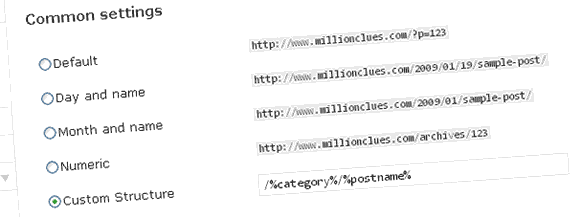
Custom Permalinks In WordPress
- Go to WordPress admin >> Settings >> Permalinks.
- Under the ‘Custom Settings’ press the ‘Custom Structure’ radio button.
- The most recommended Permalink Structure is the Home / Category / Post-Title Structure. For that enter the following in the text box in the Custom Structure selection: /%category%/%postname%
- Save the changes.
- If you are not satisfied with this Permalink Structure, read the Custom Permalinks Guide from WordPress Codex.
Remove irrelevant words from the permalinks for better Keyword weight
SEO guru’s believe that the keywords in the permalink are weighted based on the number of words in the permalink. The more words the permalink contain, the less will be the keyword weight of each keyword and hence lower will be its relevancy in a search.
Once you have a custom permalink as we did above, your posts will be automatically assigned the permalink from the title of your post. The permalink will be displayed just below the title once you save your post or after an auto save. You can edit the permalinks here. (See image)

Edit Permalinks In WordPress
Edit the permalinks and remove any unnecessary connecting words. Keep the Post Title long and Self-Explanatory for the readers and the permalinks short for the Search Engines. But do not stuff the permalinks with keywords alone. Make sure that anyone who reads the permalink gets an idea of what the post is about.
An example: The permalink of this post has been edited as optimize-wordpress-permalinks-seo-friendly. That keeps the permalink short, makes it keyword relevant and keeps it self explanatory.
If you had been using the default permalinks and wish to migrate now, use Dean’s Permalinks Migration Plugin and move safely without losing any back-links or google pagerank.
Update: WordPress says its not recommended to use Category/Post-Name style, but I havent had a problem yet. I have worked on over 200 WordPress websites. If you are concerned, you could just use the following format for the same results:
%post_id%/%category%/%postname%/
It will add the post id before the category name and each post will have a unique number in the permalink.

I am a WordPress product developer and creator of Image Attributes Pro. I am passionate about solving problems and travelling the world.





I remember using the default permalinks on my old domain. After changing them to “pretty” permalinks, my pages started getting indexed higher on Google/Yahoo within a matter of weeks. This is an important topic that many arising bloggers dismiss, so thanks for bringing it up!
There you go, I have experienced the benefits of a good permalink myslef, This post was no. 3 on Google Search for ‘optimizing permalinks’ just after 30 minutes, now its no. 2!
Amazing buddy, I never knew of this trick. It will be great to learn how to do it in the blogger platform too
Hey, there is a way to do it on blogger too, I will let you know soon 😉
Cheth, you asked and here it is: Optimize Permalinks on Blogger Blogs
Happy SEO 🙂
thanks you provide a clear example that why permalinks should be like that and I also come to know about Dean’s Permalinks Migration button.
You wont need the deans plugin, you can have cool permalinks right from the start.. 🙂
That was a really good post. Thanks for the information.
Cheers dude…
I have a doubt. Supposing I feature the post into 2 or more categories, what will happen to the permalink? In the case of magazine styled templates like Arthemia, this is the case. Please explain.
If you assign multiple categories to a single post, the lowest numbered category (The category with the lowest category id) will be used in the permalink. Read this part of the WordPress Codex for more information.
Hope that helps, Cheers
Now “optimizing permalinks” is no 1 in Google.
Great.
Wow! Never realized that. thanks for the heads up. Cheers…
Thanks for the info.
I thought of switching to the permalink that you mentioned. but didn’t do till now.
Right now my permalink has month/day/post title. Is this permalink bad when it comes to google SEO?
The inclusion of the day and date is ok when it comes to google, but it will add a time tag to your posts. You dont want your posts to die out after a while..right? Evergreen articles never need the time tag, So i dont use it in here…
(Google is not the one who tags your posts, people who see the links will think that its outdated, thats all)
Hi,
Awesome Blog. I am very fresh to read this Blog. I am also interested in latest news…
Welcome Sneha,
Glad you loved reading, Hope to see you around soon
Cheers
Hi ,I have just updated my Mobile Technology blog’s permalinks after reading your article and downloading permalink migration plugin. It is working fine . I did not lost the old links as those are being redirected automatically. Thanks a lot for the developer and you.
Yeah, The plugin is heavily used here too. I recently updated some of my slug names, and the plugin really came to my resque. Thanks for dropping in to leave the comment 🙂
Good luck with your blog!
Hi…My blog is new. I want to change permalinks of all the post. I CAN AGAIN IMPORT POSTS FROM BLOGSPOT. So i dont mind deleting all posts and again importing them.
I want to know…will this help me solve the problem. willl new permalinks work after that.
Yeah, if you wish to change permalinks of all posts and still keep the old permalinks working, this is THE solution 🙂
Green signal: Go ahead!
Its not working! I deleted all the posts, categories and tags. Then changed the permalink and wrote a post again. Its showing 404 error.
I want year/postname permalink. Please tell me how to do it!
Did you configure the plugin well..? In the deans plugin you need to specify your old permalink structure, you did that too.?
I did. Actually, my webhost yahoo does not allow .htaccess file. Is there still any solution?
Hey, I am not sure of that. Please contact Dean. He might know it better..
This rocks! thank you so much!
My pleasure 🙂
Nice article! It’s not a good idea to use the /%category%/%postname%。I use %post_id% at first.
Hope you have changed back now, use deans plugin, its cool 🙂
http://codex.wordpress.org/Using_Permalinks
In the document,there are some content like: Starting Permalinks with %postname% is strongly not recommended for performance reasons..
I think the xxID is primary key,but other are not.
using domain.com/postname is not recommended, but its ok. I am using domain.com/cats/postname which is always recommended 🙂
Ok so did what you said. I changed the parmalinks to custom and copied what you had on the post “/%category%/%postname%” (as I now know, it’s missing a “/”).
I’ve got a slight problem now. The only screen I get is blank with the wording “Forbidden, perhaps you need to change the file permissions for this document or upload an index page.”
I dont know about it, never seen it before. Hey, why dont you contact the plugin author, he might help you better.
Sorry and ty 🙂
I am using cascading drop down menus for pages on my header. All the drop down menus have a fixed real estate length. I need to make the length longer and do not know how to do this. The theme developer cannot tell me how to do this. Rather than spend hours hacking, does anyone know how to work on pull down menus?
I am open to changing themes too. I am tired of so much hacking.
Mark
Hello Arun,
After spending many wasted hours, trying to get my blog set-up from behind the scenes, it was refreshing to find your advice on permalinks. Amidst the confusion and head-banging frustrations that we are subjected to on the internet as we try to find our ways around, people like you are a blessing in disguise!
Thank you for your knowledge and expert advice,
I appreciate it very much.
Kind regards,
Charles Peter Lindup
http://www,charleslindup.com
Thanks for your kind words, much appreciated. Good luck blogging 🙂
hi arun… thank for your great info… really appreciate it… i just try it on my blog…
My pleasure, Way to go 🙂
Hi – i dont think changing the permalink structure works for changing pages.. can anyone help?
Are you looking to redirect a page after changing permalinks? This might help.
Greate……cool plugin…
This is really very very useful plugin, a must have plugin for all WordPress users. Thanks.
You said it, its just awesome 🙂
ok so i have a site 10 posts were just with the %postname%.. and i want to change those plus the new ones i added to category/postname etc..
when i upload this plug in does it ask you which posts you want to direct?
how can i tell which of the new pages are indexed or not. what if i redirect some that are not even indexed yet? great informative article you are bookmarked!
It doesnt matter if posts are indexed or not, just mention it so that there wont be any 404 errors, even from the user side, like from user bookmarks and so on.
You can see which all pages are on google using this search – http://www.google.com/search?q=site%3Aecofriendlylivingtips.com
Hope it helped 🙂
Hi I’ve been trying everything to get my permalinks to be optimized but the won’t change from old structure /?page_id=N to /philippines-business-registration or whatever i want to optimize. I’ve used the dean migrator and changed it in permalinks, but i can’t get anything. Can someone please help.
Thanks
What does it say after you change the permalink structure in WordPress, do you get a 404 error?
Thanks for this information! I have a question about your permalink suggestion. What happens if you assign a post to multiple categories (which happens about 50% of the time for me)? How will WP know which category to use? Will this have a negative effect on SEO?
Hi Arun,
great post! I use this permalinks structure and it works excellent. Also the tip about Dean’s migration plugin works like a treat!
Thanks a lot
Great ideas.
Any ideas how to get the .html file extension on the post?
Also when I add %category% in the posts do not display
Thanks
P
kuttappai rocks. thanks
TY 🙂
Hello,
“/%category%/%postname% /” and “/%postname%/ ”
Which are better?
Thanks.
both are kinda same, pick the one you like better, I like the first one better 🙂
Thank you for the information. I learn a lot from this.
Search engine optimization is indeed one of the most important Internet marketing is a perfect bridge between technology and business.
That permalink structure is realy SEO frindly ! sip deh
Indeed. With a little tweak on the permalink, we could get many more traffics from search engine like Google. It leads to better SEO.
Recently I just update my links from “url+year+month+title” to a shorter one = “url+title”.
I write about personal growth and developments, which is timeless contents, so year and month is not really important here.
Anyway, I’m happy with the change.
Great article! I’ve been afraid to change my permalink structure after I messed it up last time. Your article helped me do it successfully. Thanks
How long each post page to fit with the new permalink?? is there any plugin other than Permalink Migration plugin to move permalink
all my blogs use to be category/postname, but I was just reading WordPress’ own info about permalinks an they strongly suggest against it. They suggest using numbers (date) first then post, since adding a text slug confuses the blog and takes more time.. something like that.
But the WordPress Codex says that
“Starting Permalinks with %category% is strongly not recommended for performance reasons.”
It will only be a problem if you have too many pages. I have been using it on over 200 websites and most of my clients over the past 3 years and it has never been a problem. The advantages you have by using it so is much more than the minor performance issues 🙂
Can you help me with a redirect? If yes, please, send me e-mail.
How can I redirect with htacces a structure that were /index.php/%year%/%postname%-%post_id%.html to /%year%/%postname%-%post_id%.html (without index.php).
Is it possible?
Strange request.
I have a client who does not want to change their links but wants to move to the WordPress platform.
My issue is because they rank very high in SEO because of root domains linking back to him, a requirement is they keep the current link structure.
http://www.client-site.com/general.php?category=Practice+Areas
Is this possible to keep is current links intact so when I create a page like
http://www.client-site.com/practice-areas/ it will look like the above link.
Thanks,
Judd
Hey Judd,
Such link structure is very hard to create in WordPress. Just use 301 redirects from the old links to the new, the ranks will remain. 301 redirects tells the search engines that the page has moved permanently to the new locations.
http://wordpress.org/extend/plugins/redirection/
Just make sure you choose 301 as the redirect and nothing else.