
From the point of view of the reader, subscribing to a blog via Email has two minor short comings.
- You cannot get the content when it’s hot. Emails are delivered once a day, so you have to wait till the mail comes in to get the updates. (Knowing things when it’s hot matters at times!)
- You have to reveal your email id to the publisher. No big deal, but just if you don’t like that someone to know that you are reading?
A quick solution is to switch to an RSS reader. Yeah, that works, but you don’t like using the RSS readers, now what?
Use Google Alerts!
Google Alerts is one great piece of code that can be put into weird uses and this is one of them.
Google Alerts as your RSS Reader that comes up in email
Google Alerts lets you create an alert for any word or a phrase. Suppose you like to know when someone says your name on the web, create an alert for your name and Google will promptly send you an email when it crawl the page with your name on it.
In this case, the idea is to get notified when the target blog is indexed. Remember, most blogs that are updated often get indexed in no time.
For this, Go to the target blog and find a unique phrase that repeats over and over on all the pages. Here on my blog, the titles of each post have the name “Million Clues” attached to the end of it. Also, my name “Arun Basil Lal” is repeated on all pages.

Look into Page Titles For Repeated Keywords
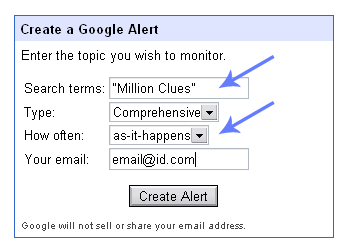 Every blog will have either the author’s name or the blogs name repeated on all pages. Look for something unique on the blog, and create a Google Alert for that word or phrase. If it’s a group of words, remember to include it in double quotes when you create the alert (as in “Charles Dickens”).
While creating the Alert, choose “As it happens”, else you will miss all the fun. Now when a new article is posted and Google indexes it, an alert is sent to you.
The two problems are solved: You got an email update of the new post, and you didn’t leave your email address!
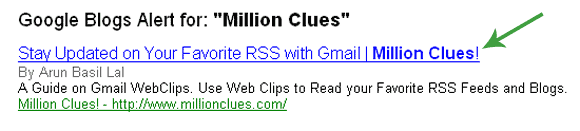
The Google Alert as it Hits your Inbox: See the Page Title
Nasty: Some publishers would be thinking that I am advising something that will ruin them, because if you do this, you don’t count in the Feedburner counter. Hey! If someone has to read the article, they have to come to the blog, which means something, right?
Bonus tip: To track when Google indexes you, apply the above tweak to your own blog, when Google indexes you, you get an email. How is it?

I am a WordPress product developer and creator of Image Attributes Pro. I am passionate about solving problems and travelling the world.





Hey, Great Trick. Ingenious one 🙂
Thanks man! I use it to track lots of Blog-Celebs, its like my Social Secret Service 🙂
It might work for smaller blogs, but not for the bigger ones where you get breaking news and stuff. It will mail you every reference on the web for that site.
Do correct me if i am wrong.
Anand,
I got your point, I created an alert for “the anand” and I get tons of email daily. i am not kidding, if you havent made an alert yet, make one and see the updates coming in. But most of them are not about the Brand “The Anand”, they are literal.
For popular blogs, use some text from the footer or something. Usually blogs are mentioned only by its name, but there are many unique stuffs that are repeated on all pages.
For instance on your blog, the sidebar has “TheAnand’s Best Posts”, use that as the keyword for Google alerts and you will get only those alerts from your blog!
Btw, its good for tracking people online. I created an alert for Mani Karthik and I could track all his guest posts and mentions! See he had a post on “8 ways to make a celeb befreind you”, Tip No 9: was paying them via paypal, and Tip 10: create a Google Alert and track him where ever he is online.
I have an alert for Binny and I get alerts when ever he updates any of his blogs. He has lots of blogs where he store code bits for later use. You wont even see a link to it anywhere 🙂
Does Goog index the blog post as and when it is published?
No. So I’d say, this is not an alternative to RSS but may be slightly better (faster delivery) than email subscription.
Its not an alernative I agree, but you could get the update even before RSS.
See, popular blogs are indexed in under 5 minutes and you get the alert instantly. If they have not included a Feedburner ping in the ping list, Feedburner will take 30 minutes to update the feed, so you get the news faster than RSS.
But in most cases they will have a Feedburner ping, so it doesnt count. btw, I had said right at the start, its for those people who are not comfortable with RSS readers, why, there are many, I know 😀
The Fight Club is back!
Wow thats some thing interesting to try out. Thanks.
Create an alert on your name to see how fast you are indexed 🙂
Friend I didn’t get you. Can u make it clear?
Create a Google Alert with “Amal Roy” or “computing Unleashed” as the keyword. When Google indexes your latest posts, you will get a mail..! Got it..?
Yep. Got it right.
There you go 🙂
Interesting post yar !
Will try to produce a similar one in my blog ! 😀
Cheers !
Content copy..? I will have you sued 😛 😀
lol, just kidding, good luck..
Great tip arun…
Thanks. I might try creating a google alert for test purpose and see how it works…
Go ahead man, it really works 🙂
This is really good feature for those person who spends maximum time in e-mail box.
Thanks Arun 🙂
Glad that I could be of service to you 🙂
Thanks for the tips regarding blogging, it was very helpful.
My pleasure 🙂
Nice share mate ..It was useful 🙂
Pleasure, welcome aboard!
since more than 2 yrs am using this Google Alerts and it works! amazing thought arun! I really appreciate the effort that you put in and share your knowledge with others. Keep rock the show! all the best
Thanks Malini, Have we met on Facebook before? Glad you loved this idea.
I will try that! Let s see the results.