
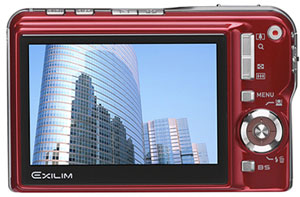
 We often find eye-candies and hidden tricks in Softwares and mobiles. But we rather never expect such secret hacks to be present in other non-geeky gadgets like Digital cameras or LCD televisions.
But the truth is that every gadget has some kind of hidden hack, which are unveiled when one starts to experiment with them. Here are some hacks in a Casio Exilim Camera. If your camera is not an Exilim, this should give you an idea of how to discover hidden tricks in yours.
Casio Exilim Secret Hacks Unveiled
Start the Camera in Audio Recording Mode: Holding the ‘DISP’ button pressed, switch ON the camera [Record mode]. The camera lens does not zoom out and the camera starts with the voice recorder. This can be useful when you wish to record an audio clip using the camera. As the lens does not zoom out, there is some savings in the battery. Remember to keep holding the ‘DISP’ button until the camera unit is on to get this result.
Software Version: Switch on the camera keeping the ‘MENU’ button pressed. Before the camera switches on the LCD Screen shows the version of the software installed on your camera. This works in both Record and Play modes. As in the other case, remember keep pressing the Menu button, till you get the version number.
Invert the display: In the Play mode, when and image is being displayed press the ‘SET’ key and the shutter [Half-Shutter]. Then the display will get inverted. This can be useful when you wish to show someone the image conveniently. There is no need to press the shutter button fully. Half shutter will do. Press the half shutter again to return to the normal state. Note that, the image is not actually inverted in memory, just the display is inverted.
Unknown Hack: Press DISP + MENU + ON together. Keep pressing till the camera unit fully on. Now the display will give you some information about your camera. Here is what I got.
++ KX 877 ++
PR: 04.03.16.09.13
L: 1.45
MI: 26
I asked what this is to the Casio Customer Care many times. I never got a reply from them. I guess this is some details of the software installed in the camera. (Please add a comment, if you know what this is)
These hacks have been tested on Casio EZ 30 and EZ 40. It should work on all Casio Exilim’s, if it doesn’t please report it.
If your camera is not Exilim, try similar key combinations and you might end up with something cool. Also share your findings here for the benefit of the community.

I am a WordPress product developer and creator of Image Attributes Pro. I am passionate about solving problems and travelling the world.





Yeah, every gadget will have a way of firmware updates and information.
Guess you are right, The Sony Bravia TV in my living room have some USB ports on the back panel and its marked SERVICE ONLY.
Cheers
Great site.
Thanks Sesso, Cheers
hey arun thankx for the tricks will try it soon on casio exilim n let u know did they worked or not..
That would be fine. All those are tried on my Exilim cam, so they ought to work. Just drop by if there is any probs. Cheers..
I have casio Exilim EX-z80 and the only thing that works for me is the software version hack
You should try some key combinations, there might be more hacks in it.
Hi there,
I’d like to update the firmware of my EX-Z80 on the Ver.1.02 US.
My Camera has got Ver.1.0.2 in GER already. Did I have to downgrade before or what can I do?
A Re-Install of the US-firmware isn’t possible yet 🙁
Could you help?
Casio EX S600
Recording mode and Display invert dosen’t work
Show Version works
That unknown Hack works wit a diffrent key combination
Disp + BS + ON
and gives Information like
++ kx836 ++
Ver. 1.00
on the ex-z80 the key combo is also disp+bs+on
I got:
++ kx1122 ++
Ver 1.01
(note this version number is the same number that comes up when i hold menu and on)
Casio EX FC100
Disp + BS + ON
gives Information like
++ kx1162 ++
Ver. 1.00
I have Casio Exilim EX-Z450.
For me only the “show-software-version” hack works.
“Start the Camera in Audio Recording Mode” & “Invert display” won’t work.
I did not try the “unknown hack”.
Anyone knows where to get the Exilim EX-FC-100? I erased it by accident and my camera is dead. Not available in any Casio´s support site. Any help will be appreciated.
Felix
I have a casio EX-ZR 1000 with high speed recording capabilities up to 1000 fps. As a default, it olnly allows to record 13 min of high speed footage, regardless of size of SD Card (I have tried 8 GB and 32 GB). I need to change that setting to 30 minutes or more. Is it possible to do this?
I have a Casio Z-85 laying around
none of the “Hacks” from above, except for the “Unknown Hack”(BS-DISP-ON) works.
Tim
Hey Tim,
This was a post from 2006! I had an EZ 40 and these worked on it. Had forgotten that this article even existed.