
Some time back, we had seen how a Simple Fast Forward Button can show how much you respect your reader’s time. (get it here) Today, I just tweaked some code so as to say hello to first time commentators. No, this is not about those plugins that send an email when they comment, in fact this is not about any plugin.
Here is a screenshot of what the result will look like…
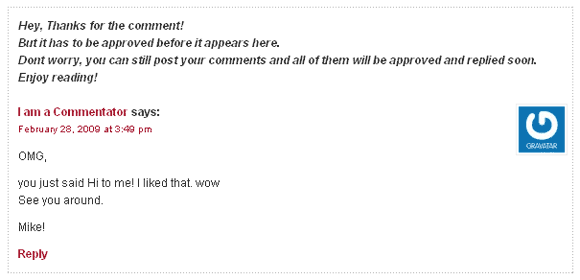
Usually, when a comment is held for moderation, you get the message ‘Your comment is awaiting moderation’. Well, this doesn’t help us much; some may not even understand what that mean. The idea is to edit that default message and display a friendly hello message as above.
Say Hello to First Time Commentators
The default text ‘Your comment is awaiting moderation’ is inside a file comment-template.php. We are going to edit this file, replace the text with our new message and tweak the position of the message so that it looks good. Follow the steps.
Find the file: the file comment-template.php is in the wp-includes folder of your WordPress installation.
Download it: Bring the file to your computer via your favorite FTP program.
Backup the file: Save a copy of the file securely. (Backups don’t mean that you are going to make errors, it’s just the part of a standard procedure.)
Find the text: Open comment-template.php in a text editor and search for ‘moderation’. You will end up with a line like this on line number 1229 if you haven’t edited the file before.
<em><?php _e('Your comment is awaiting moderation.') ?></em>
Write your message: Replace the text ‘Your comment is awaiting moderation’ with your own custom message. You can use the standard html here like line-breaks and italics. By default it takes the style from your style sheet. Make sure that the message is more general because at times comments from old commentators will also go into moderation. They might be annoyed to find you thanking them for their first comment.
Tweak the Code: If you save the file after the last step, the message will come after the name of the commentator as below.
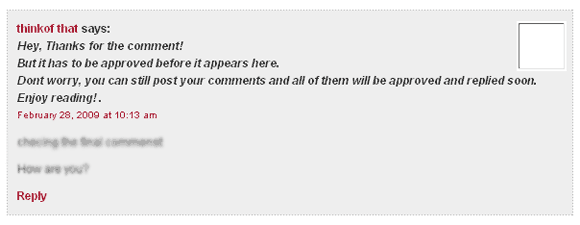
So move the line you just edited to above the name of the commentator in the comment-template.php file . The final code will look like
[sourcecode language=’php’]
< id=”comment-“>
div id=”div-comment-“>
comment_approved == ‘0’) : ?>
%s says:‘), get_comment_author_link()) ?>
[/sourcecode]
Enable Comment Moderation: Go to your wordpress admin > Settings > Discussion and tick the box that reads ‘Comment author must have a previously approved comment’. By enabling this all the comments of first time commentators will be held in a moderation queue, even if it doesn’t contain any link or spammy content.
That’s it! Oh, if you don’t like to have the fun of editing the code yourself, just copy and paste the above code replacing the appropriate code in the file. If you have an editor like Notepad++ that shows you line numbers, then replace the code from lines 1220 to 1230 with the above code.
Wish to see a working demo? Try leaving a comment here! 😛
Update: Kim raised an issue regarding this method. She pointed out that, when WordPress updates the core files (i.e. when we move from WordPress 2.7.1 to 2.7.2 and so on..) they might replace the comment-template.php file. So we will have to do it all over again. Though wordpress won’t be replacing the file with every update, we will have check if its working each time. So thats one limitation of this tweak. She have written a related article which the code lovers will enjoy reading. Check it out. Thanks Kim!

I am a WordPress product developer and creator of Image Attributes Pro. I am passionate about solving problems and travelling the world.





Another great tip, Arun! Thanks for all of these. On my particular site, I don’t hold comments for moderation, but I can see where this will come in handy for other blogs! 🙂
Thanks dude,
I think wordpress admin should include an option to let the bloggers decide what text to display. Then we wouldn’t have to touch a bit of code.
But there is going to be an issue when wordpress updates its files (suggested by Kim). We would have to redo all these again. But that would be only once in a while because wordpress wouldnt replace all the files in every udpate. Only when this purticular file is updated we would have to worry, though we will have to keep an eye for it with every update.
Cheers!
You tutor,
This is excellent tip from you!
See ya
-girish
Thanks Giri, Glad that you loved it!
Cheers
Great boss!
I’ll use it in my blog too
Glad that you loved it. Have a nice time tweaking the code!
Cheers
Arun,
Thanks for the mention 🙂 That is a great tip too. There’s so much that can be done when you edit the core files. I would need to make a list of my changes because overtime I would forget what I edited. Another drawback to editing the core files is when you work with clients – they aren’t going to want to worry about these files and are going to call in a panic if an upgrade wipes out their customizations.
Yeah, thats right, when we work for clients we wouldnt want that to happen. But basically, such tweaks are aimed at those freaks who would love to tweak their theme to the limits. For those who love handling codes, this is going to be fun.
Afterall, being able to edit the core files is the true spirit of a Open source Blogging platform!
But I had never thought of the upgrade issue before you said it. Now I have to make a list of tweaks I have done too!.
Kudos to you, Kim!
Thanks for this tip.That really shows how innovative you are.Keep the good work.I will also implement the same.
Also make sure that you track the wordpress updates to find if they have changed the file you are going to edit now. I will be posting them (if any) here as updates when a new WordPress Update comes by!
Enjoy the tweak!
Hey
I got an email reg the first comment!
Is it automated or you sent manually ?
That was automated, Glad that it worked for you. 🙂
Very simple but really good thing to have a custom message. It helps a lot.
Someone asked me once, “what does ‘Your comment is awaiting moderation’ mean”. This is my answer!
Nice Tip Arun
ah, I guess you just enjoyed a live message! Glad that it worked with you! 😉
Ok let me see your msg…
h.mmm…. its cool
Ah, so you saw it working!
Glad that you liked it 🙂
see you around!
Cheers
Should I use tag for introducing a text in new or next line ? 😉
I meant Break Tag ! 🙂
I am not clear with your question, if you are talking of the break line tag, you can use it anywhere. Try it out…
But it doesn’t fit in my blog. ‘Your comment is awaiting moderation’ appears somewhere below the gravatar on the left site in light colors. So I doubt whether the commenter has even observed that. So this won’t make a difference to me. But for blogs like yours, it does matter.
No, I think you are a bit wrong, I saw that message last time I commented. But you dont have space to put a long message like I have, a short one will still work 🙂
right on the spot,thank you……..
You are welcome 🙂
Wow! Something that’s innovative & never thought of, encouraging a new commentator. Awesome one, Arun.
Hey, thanks. btw, I think you didnt see it in action here. I hadnt updated that after the last wp upgrade 😉
Thanks for this amazing post. I never thought how much this can affect the users experience on my blog.
Glad I changed it today 😉
I’ve implemented this on the website on my signature. It is simply great. Thanks bro.