
The BIOS password is a security feature in the BIOS of the computer. Once enabled, the user cannot access the system without entering the BIOS password. This password secures the basic input-output of the system. The system boots only after receiving the password, so there is no way to enter without knowing it.
Once you forget the BIOS password, you are completely blocked out of your system. No password reminders or alternate questions. Thankfully, there is a very simple way to reset the BIOS password.
Hacking the BIOS
To reset the password, the BIOS has to be put into the configure mode. This is done by replacing a jumper on the board. (A jumper is nothing but a piece of metal that shorts two contacts.) For the Intel 845 gvsr motherboard, the jumper is near the motherboard battery. (See image). Refer to your motherboard manual to find the jumper.
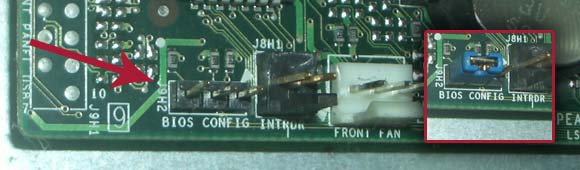
Jumper Leads. Inset: Jumper Placed on the Leads
Just replace the jumper into the configure mode, and switch ON the system. You will see something similar to the following screen.
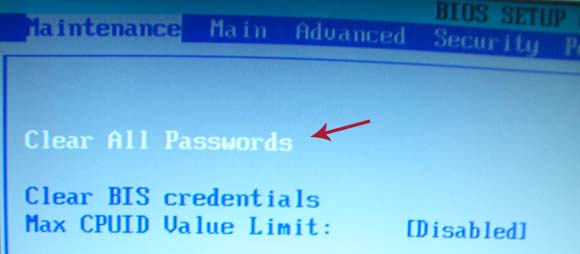
BIOS in Maintanence Mode
Select ‘Clear ALL Passwords’ and both Supervisor password and System Password will be reset. You can install a new password in the Security tab. Press F10 to save and exit. Turn OFF the system, replace the jumper to the initial position and turn ON the system.
All demonstrations are based on the Intel 845 gvsr motherboard. Most motherboards will have a similar jumper. Refer to the motherboard manual.

I am a WordPress product developer and creator of Image Attributes Pro. I am passionate about solving problems and travelling the world.





Before removing jumper , you may also try with any Bios backdoor passwords provided by manufactures .Google the word “Bios backdoor passwords” you will get many .
Never knew there was something like backdoor passwords or default passwords for BIOS. Thanks for sharing.
Looks like all my friends read QOT. lol. Thanks for reading.
Guys, you can find a good collection of Default Bios passwords here: http://www.freelabs.com/~whitis/security/backdoor.html
If yours is not there, Just Google ‘Bios backdoor passwords’ for a full list.
Cheers
I never heard of Backdoor passwords or even default passwords for BIOS. So, this is something new to me. Thanks buddy!
Just found: Mobile devices have the backdoor passwords too, grabbing more info in that regard, will let you know…
Btw, I saw your guest article at QOT :-)…
styling the images with text and border is really great dude…. keep going
thank you for its information, I try first
I hope you have opened your cabinet for ther things, else be careful.
Also give a look into the newyear giveaway, just 30 hours more.
For me, I just reset the password by just removing the cmos battery for around 10 seconds, then place it back. Doing this should let you manually set the system time and date from the BIOS menu and set your chosen password again (if you want) before you let it run again.
Wow! Never thought of removing the battery, thats pretty simple and you dont have to tangle with the jumpers on the mother board. thanks for sharing.
BTW, just cheked out your site, The OBP logo is cool..
Cheers
Thanks for the compliment about the logo. I honestly think it looks odd and I was about to remove it. But now i changed my mind. BTW, congratulations for being the top so far on Ajith’s contest. And oh, I love the template that you used for this blog especially the blending of different gray-black tones plus the little touch of red on the links. Looks good.
Hey, if you are not satisfied with your logo, change it soon. Personal satisfaction is very important. 🙂
BTW, I have just uploaded some logo designs that you might consider. See this collection.
Thanks for the mention of the DS contest..
Cheers!
So good password is not not good enough if bad guys can touch your computer physically? sound scary.
Dont be scared, use the tricks from the post, and you will be safe from them for ever!
Wow!! That’s indeed too good a trick. Thanks, I’m goanna need it in the near future. 😉 Backdoor passwords are also good. 😀
And, I’m back to your blog after a short hiatus. 😀
Welcome back Hari, and my best guess is that the acadamics or IEEE kept you busy throughout.
See you around!
Quite useful advice. I’ve used this type of procedure before when troubleshooting computers but had a BIOS password in place that no one remembered what it was.
You are welcome 🙂
I have found that BIOS/CMOS Password Recovery Tool is the most effective.:
BIOS/CMOS Password Recovery Tool is a program that works instantly to remove any lost or forgotten BIOS/CMOS password. Simply boot your PC to DOS and execute the program, and get access to forgotten BIOS/CMOS passwords in just seconds
BIOS/CMOS Password Recovery Tool Service: http://www.biospasswordrecovery.com/
if you need a bios master password go here its free http://biospasswordhelp.blogspot.com/
how to bypass r60 ibm bios password