
 Google’s Social networking site, Orkut recently did some security updates that would disallow anyone to save images from Orkut photo galleries. This is in addition to a security feature added some months ago, that permits users to disallow strangers to access his / her photos. So now you can block your images from strangers and even if someone can see your image, he can’t save it.
Orkut, being a social Networking site, is one place where people share their photos and there are cases when you have to save the images for offline use. Like, you might wish to save the recent party photos for some later use. Here are five ways to save Orkut photos.
Saving Photos from Orkut Galleries made easy
Disable Java to Enable the Right Click Menu
Orkut added this security feature simply by adding a bit of Java Script to its pages. The script disables the Right Click Menu and once you don’t have the right click menu, you can’t save the photo. Just disable the Java Scripts on your browser and the right click menu will come right back! And then you can save the images.
How to Disable Java Scripts?
- Firefox and Flock Users: Go to Tools >> Options >> Content >> Uncheck ‘Enable JavaScript’ and ‘Enable Java’ >> Press OK
- Opera Users: Press F12 >> From the Menu that appears, Uncheck ‘Enable JavaScript’ and ‘Enable Java’
- Internet Explorer: Follow this Guide! (I seldom use IE and had to google to find the solution)
- Safari: Edit >> Preferences >> Security >> Uncheck ‘Enable JavaScript’ and ‘Enable Java’
- Google Chrome: Disable Java Script with this tutorial.
Use the Firebug Firefox Plugin to Remove the Java Script
If you are on Firefox then you have lot more options to save images. The Firebug Firefox Plugin (never heard of it? Read about Firebug) can edit the code in real time. Load the image that needs to be saved on the browser, and press F12. The Firebug Console pops up.
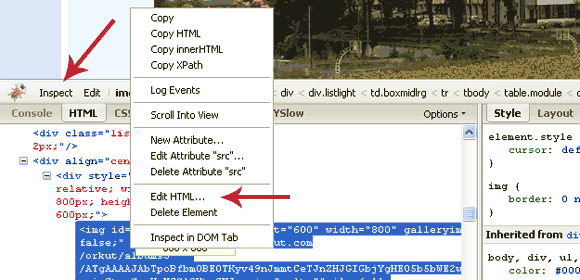
Disable Java With The Firebug Firefox Plugin
Press the inspect button and set the focus on the image. Now right click the code of the image in the console and select ‘Edit HTML’. From the HTML code editor, delete the following code:
oncontextmenu="return false;"
Now the right click menu is enabled and you can save the image!
Drag and Drop image to a New Tab
If you still need more options to save images from Orkut, Tech Tola has three more solutions. One easy way which he advises is to drag the image to a new blank window or tab. That’s the easiest of all. Find details on the easy ways of saving the Orkut Galleries on Tech Tola.
Remember to save images responsibly… 🙂

I am a WordPress product developer and creator of Image Attributes Pro. I am passionate about solving problems and travelling the world.





Thanks for the tip. Haven’t checked orkut from last week. Will check it out
Me too! I was away from Orkut for a long time and it wasn’t untill my sister said she cant save images, I looked into it! I was late to find this.. 🙁
Oh might come pretty handy sometime… but I stopped orkutting its a big waste of time.. twitter can be more productive than orkut
Yep, Twitter us
100no, 1000 times better than Orkut, just that we cant have picture galleries there..Hey buddy.. thnx a lot of the backlink dude..
hmm.. regarding twitter vs orkut..
Well.. Orkut is for common man.. and Twitter is mostly used only by techies..
Orkut is your personal character projector on the web with profile details, testimonials, images, videos.. Orkut is more than just communication..
Twitter and Orkut are two very different things I suppose 🙂
Someday normal people also will stream into twitter. Right now, everyone on twitter has a blog atleast 75% of them..
And… I got the theme uploaded myself.. I guess you wanted to check it out..link
Yep, the new link is perfect.
Guys, Follow this link to see a a Vista desktop alink WordPress theme, You will love the real-time customization this theme has, the reader will have a virtual vista desktop and posts appear in windows!!! Check it out.
you can always drag picture to URL bar 🙂
Yep, Techtola’s method is the easiest I guess, but I use the Firebug approach!
Great tip man… I hope that disabling the JS wouldn’t affect the navigation (prev – next image) further…
Ajith,
I am not sure of that, if the back and forth buttons ply on Java, then its not going to work.
I think the method Quakeboy mentioned is the best. Just drag and drop the image into a new window, I am using that.
I never thought of the buttons before this, must be beacuse I am fed-up with the spam scraps I get there.
Do try it out to be sure,
Arun
1, Use the browser Maxthon > It allows you to save Images
2, If you are opening Orkut with IE, Go to Internet Temp fiels, you can save the Images
🙂 🙂
Hey, thanks for the extra tips and welcome to Million Clues!
I had never heard of Maxthon, will check it out. I had left IE long while ago, thats why I never thought of it. I still see people using IE, even after the media reporting the security holes in it. I guess they are those who love taking risks!
Cheers
Nice tip. I looked for this long back ago but seen only now. Thanks.
You should see the ideas of TechTola too! His idea of drag and drop is the best, I am using that one!
Arun Basil La, Thanks 🙂
Well, I’ve never used Orkut. I’m a fan of the more popular networking sites such as Twitter and Facebook. (MySpace too – but MySpace is no longer king. Twitter and Facebook are king and queen.) I’m inclined to use Orkut when, and if, it becomes more popular. Nevertheless, thanks for this tip. It’s a little scary to mess with the Java script – at least for me. (And I’m sure for the other people, like me, who read your blog and who are not particularly technologically savvy.) However, once again, your instructions are clear and to the point. Which is one of the things I like about this blog. Your instructions are designed for everyone to understand – not just the advanced techs. (I’ve signed up for your updates.)
If you havnt used Orkut yet, you wont probably get the chance to use it, its almost dead. Twitter and Facebook are much much better.
I am a twitter Addict myself, Add me up in Twitter, I am here and lets tweet-up!
great tip indeed.i use firefox and have enabled java
Actually u have to disable JAVA to save images 😛
If you dont have the patience drag the photo to the url address bar of the browser and download the photo by right click save photo
Thats it! Thanks for sharing Tej!
Good to see ya here…
your guide is too use fulll..
i got all my missed photos…
thank you..