
Have you noticed the small line of Text that comes above your Emails in your Gmail inbox? Google calls it the Web Clips not Ad clips, because that portion can display links from any RSS Feed!
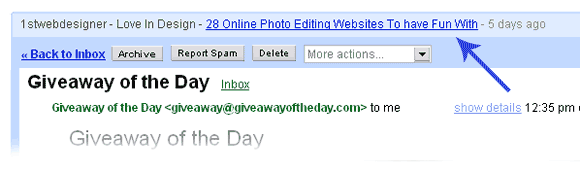
Using Gmail Web Clips
Follow the instruction in the following screen shots.
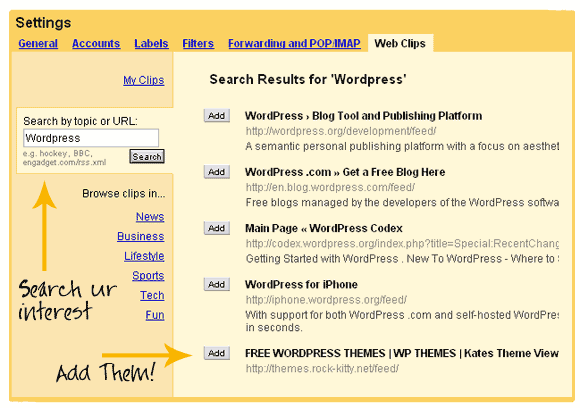
Search For Your Areas of Interest and Press Add
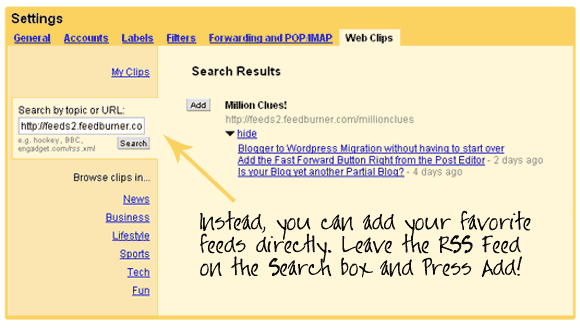
Give Your Favorite RSS and Press Add
The greatest advantage of using Web Clips is that you get the updates right when the RSS is updated. Web Clips will help you, if you are someone who doesn’t check their RSS reader often, but spent a lot of time emailing (like me!).
Suddenly I found a lot of productivity in that small area which I never paid attention before. Make use of it 🙂

I am a WordPress product developer and creator of Image Attributes Pro. I am passionate about solving problems and travelling the world.





Yah Arun this is better method to read our favorite website feeds in gmail, instead of viewing Google ads.
@Alok
How many web feeds can we include there? I guess it’s only 1. So if you follow only a single blog, you can make the changes as said.
@Arun
My lappy gave me serious problems which kept me away from Internet for a week. But I’m back now..
I know this method before but didn’t bother to make those changes. My eyes don’t even fall on that line above the Inbox. As soon as I open the mail, I quickly go through all unread mails and jump to G reader.
Glad that you’ve posted the method here for those who don’t know this yet.
I spend most of time in reader rather than emailing, which again brings up our dissimilarities in interests 😀
Sriraj,
Actually you can add as many feeds as you like, I have added a lot of my favorite feeds there. And you dont have to add a direct feed link, just search for the blogs name and you should get it.
Yeah, I too was wondering, what happened to you 😛
Infact, I too am not able to be online now, its exam time bro, starting tomorrow. So I dont know how I am going to find time to blog this month. Exams are a but more important as of now, forgive me when I take long to reply to comments..
We have a lot of dissimilarities, thats true, Glad that both of us are interested in Blogging 😀
Thats the only thing in which we have a common interest I guess…
Do you drink Coffee.. ? 😛
Yes I do take coffee. Infact, I take ONLY coffee.
May be you don’t 😀
BTW, all the best for your exams.
Lol, me too, I am a coffee addict myself 🙂 So we have something in common. People who drink coffee stay together 🙂
Thanks bro for the wishes, have to make a show there, else the “LICENSE TO BLOG” would be gone for ever 😛
Yeah, Its good to see them instad of the ads, buts ads to come in between, the ads are marked as sponsored links, look for it!
Thanks for sharing, I didn’t know about this.
My pleasure 🙂
Nice tip, helpful for those who spent lot of time with email. buddy thanks for sharing
My pleasure Jagan, *glad*
Never even clicked on it before. Thanks Friend for informing about it
Me too, never touched that area before, But Its a useful spot now.. 🙂
btw, I just noticed that you have crossed your 50th (in fact 52) comment here, Really appreciated Amal, thanks for the awesome support 🙂
All the best for you 🙂
Thanks. This blog is really encouraging me a lot and i love it.
Thanks for the words mate, Love you too 🙂
I never noticed this feature, as I am using gmail with basic HTML version as default.Good find Arun.
Why basic HTML..? To save on Bandwidth..? or is it a slow connection..? I think the Standard view is better for slower connections (once it is loaded). Use it on a old browser and you have the best result, I am doing that 😀
For this, I abuse Thunderbird. >.< Is it bad?
Overall, I don’t like working online, my internet connection isn’t that fast. With it, I had to find a working solution and Thunderbird came as a savior. It has RSS reader, Gmail integration and almost everything I need to communicate.
PS: It’s free too lol. 😀
Hmm, I used to use Thunderbird in my Dial updays, Its cool.
btw, you should try getting a faster email connection or else, read this 😛
Being online, there is nothing close to that 🙂