
 If you use PDF’s with forms to receive feedback from people, here is the ultimate tool for your job.
FillAnyPDF lets you fill in PDF forms and share them online. You don’t even have to create the fields, you can write anywhere on a PDF! No more printouts and faxes.
FillAnyPDF is simple and intuitive. You upload a PDF, and you can write into it instantly. Open it in the editor and start writing anywhere. Also share them instantly.
To get a better idea of what FillAnyPDF can offer you, have a look at this demo page.
PDF Forms made easy
- FillAnyPDF comes with tools to Type in, or draw using a pen or Sign-off in a signature style.
- You can share your forms and invite others to fill it out. The recipient doesn’t need an account even! (I have a form here, try filling it. See, you don’t need any software!)
- You can see the entire filled out forms in one single list.
- The free account lets you save 5 blanks pages and 50 filled in pages, if you need more capacity of up to 500 blank pages and 50,000 filled in forms (of course with extra features), consider a paid account.
- Take a tour, see it all!
The form import wizard options are made with the office in mind. The optional settings let you decide when a form should expire, besides tagging and revision number.
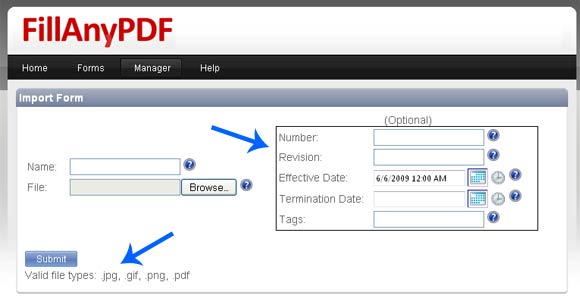
FillAnyPDF Import Options – Watch the arrows!
I liked the concept, but was annoyed when I got logged out of my session when I was idle for sometime, I don’t think it has to be that secure, even gmail stays longer. Maybe they should allow users to choose the length of the sessions.
Though there are options to download a filled in PDF, if you wish to download all filled in copies of a single PDF, you will have to do it one by one. Maybe the developers will add an option in future.
Overall, the service looks good; quite useful and the interface is neat and handy. How did you like it?
P.S: Did you see that FillAnyPDF accepts images too? An image to pdf converter, does that rings a bell?

I am a WordPress product developer and creator of Image Attributes Pro. I am passionate about solving problems and travelling the world.





Great share buddy.
Great share arun.
Thanks.
Thank man, Glad that you liked it 🙂
Or you could fill out your PDF free online with these (and more features) at http://www.pdfescape.com
Thanks for sharing, looks like there is a competition.
I was doing some research on this topic tonight and found this article. Trying out http://www.docq.com as it has a good free trial. May try this one later, but I think the docq form designer and form filler will work fine.
thx for the post.
You are welcome 🙂
I really appreciate having this new tool. I’ve needed it for years. I haven’t figured out how to use the whiteout yet. It didn’t work. The instructions also say there is a way to put your signature in by hitting an ‘S’ then typing it. I couldn’t find any ‘S’. I suppose I’ll get this figured out eventually. In the meantime, it very helpful as it is.
Gerald,
This review is a lot old, things have changed right now. In fact, Brain wrote me recently to tell me about some of the new features like Embedded Forms and Image support.
Will do an update 🙂