
In a TED Presentation, David Pogue says how Simplicity Sells when it comes to Software design. I think Tudumo is just what simplicity is meant to be. I can say that because I actually sold a copy of it.
Tudumo is a To-Do list maker. It is a clean and elegant way to manage your tasks.

To start with, head over to Tudumo.com and download a trial copy. Unlike many other trial software’s, you don’t have to wait for a splash screen and you are not reminded about registration. For 60 days, you can use the whole full version of Tudumo as good as a registered one.
How Tudumo Works
Tudumo uses Headings and Tags to organize the list. You can add all the actions (tasks) related to a specific project under a heading, for instance, and all the things you got to buy from the store under a common tag.
One can set a due date and time for a particular action, and when its about time, Tudumo gives an alert. Every action can have any of the 6 states. For instance, actions that are not important at the moment can get the status ‘Someday/Maybe’
The software installation comes with some sample headings and tags and some shortcut tips. The help is also simple, yet comprehensive.
Shortcuts
There are some easy shortcuts to deal with all the tasks. The Quick Add Shortcut (Win KEY + Ctrl + T) is amazing; a small window pops up – add a task and tag right from there. Anything followed by @ in the quick add window is considered as a tag.
Another thought out shortcut is the Esc key. Pressing Escape key closes down Tudumo to the Task tray, near the system clock.
(Common Shortcuts: Ctrl + N for new task; Ctrl + H for new Heading; Ctrl + T to add a tag; Ctrl + D to set the due Date. Press Ctrl + F1 for more Shortcuts)
Tudumo Live
Screen shot of a Tudumo Window:
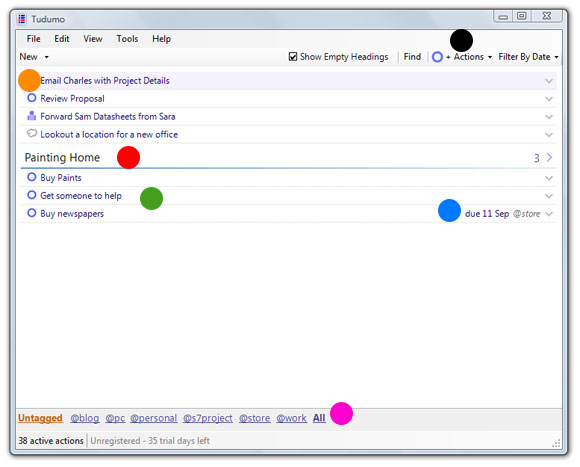
- Green Dot – Action or Task
- Red – Heading
- Blue – Due Date (when the task is overdue, the date turns red)
- Orange – State of a Task
- Black – Filter (based on state of tasks)
- Pink – Tags (clicking it shows tasks with the same tag)
On my Vista Home Premium 64-bit, I had a minor problem. I have set it to start minimized when windows starts, but it just wouldn’t start minimized.
For $30 a copy, its well worth an investment. Try it out, I bet you will like it.
Do you use any similar GTD software? How do you manage your tasks?
Related: Time Management Tips for the Busy Bloggers

I am a WordPress product developer and creator of Image Attributes Pro. I am passionate about solving problems and travelling the world.





Glad to see the software I introduced you to has spurred a blog post of its own! I am sure your readers will love it!
Blessed be the day I saw this, am totally into it. Amazing software 🙂
Great review – thank you! I’ve linked to it from my testimonials page 🙂
Hey, Thanks for linking this up! Your creation is amazing 🙂
Nice software, actually I was using ToDoList and MS Notes for managing my work but yes Tudumo is really cool and light weight.
Tudumo was my first software of its kind, am lucky, I found the right one!
Great this is some thing i really want. I am a Procrastinator (not always) and i forget things too. Tudumo will be really useful for me. Liked the features of it.
Thanks Bro for writing about such useful stuffs.
And I am Happy to See That I Have crossed the 100 comments mark and This is the 101 th comment in million clues by me. 🙂
Good Luck
OMG, 100+ comments, I have just over 120 posts now, you have read almost every post. Thanks for the great support! 🙂
I read all of your posts because i like each and every one of them very much. Million Clues is the First site to impress me very much.
Cheers
Thanks again!
cool…getting started now..so u got another thing to make people addict on..lol..
Lol, But all other stuffs were free, this is not. But I tell you, its well worth it.
When you have great stuff with you, its always easy to sell. See WordPress, see Twitter. so is this 🙂