
I have been working on a couple of projects lately, and all of them wanted one thing in common. They wanted to block users while the site was getting ready and show them a “Coming Soon” page instead.
Many plugins are available to allow only logged in users. After trying out many such plugins, I found this plugin – Members Only. Its simple, Free and Awesome!
Block Out Non-Members with Members Only
Using such a plugin has two purposes. One, Prevent Users from seeing your site when it is getting ready and two, block out search engines and prevent them from indexing your content before its final.
Members Only does a lot more than that. It can:
- Block Visitors from your site and Allow Only Logged-In users. This also blocks out search engines
- Take a normal visitor, who doesn’t have a login, to any page you specify, may be a “Coming Soon” page or a “Contact” page.
- Protect your RSS Feed and allow access to registered users only using Feed Keys.
Using Members Only
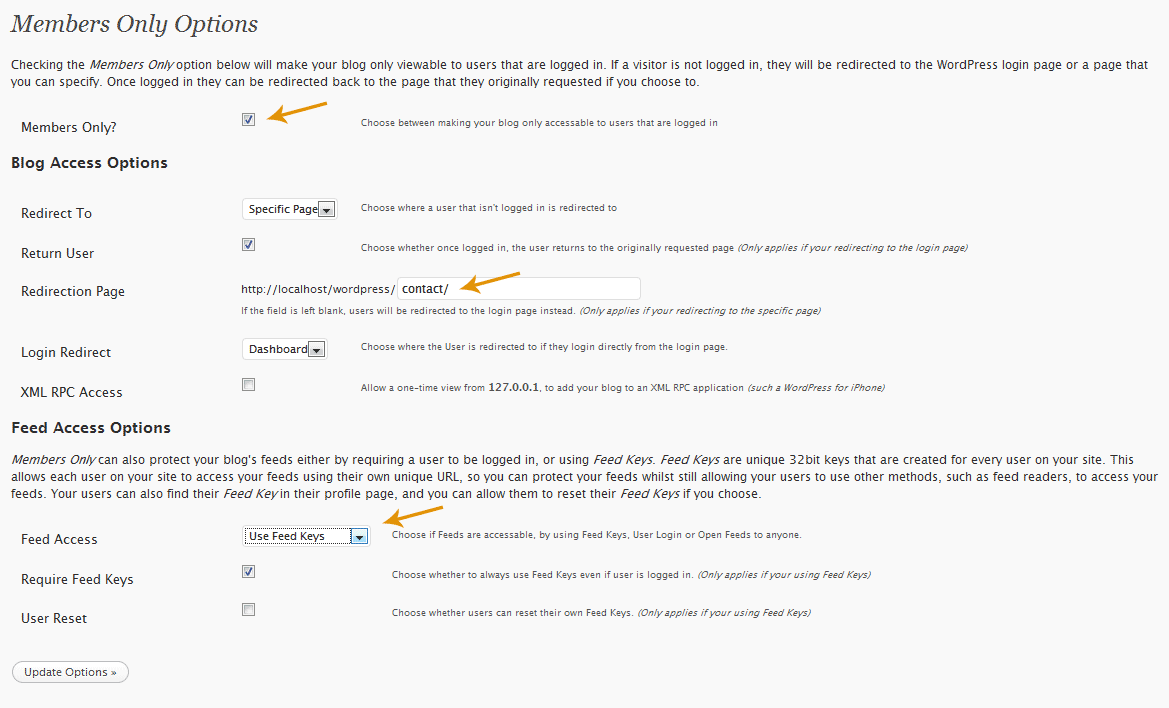
Install the Plugin via WordPress Plugin Installer and activate it. Now From the Settings Sidebar go to Members Only and check the box that reads “Members Only?”
Everything else is intuitive. Click the following image to see the Full Options Page of Members Only:
Logged in Users can access their Feed Key and the custom feed URL from their Profile page. An example of such a feed is:
http://doman.com?feed=rss2&feedkey=b83ef6af61724c8bc8002270099032c2
Users can add this to their Feed Reader and read the RSS Feed the normal way. When I tried opening the feed in the browser after logging in, it gave an error, but it worked once I logged out.

I am a WordPress product developer and creator of Image Attributes Pro. I am passionate about solving problems and travelling the world.





Thanks! I`ve been searching for this for a long time.
🙂
Not working in 3.0 i think… checkbox always turns itselfs off…