
Most WordPress themes add a meta generator tag to the code. This tag is used to get the statistics of how many sites and using which WordPress versions. It looks like this in the browser:
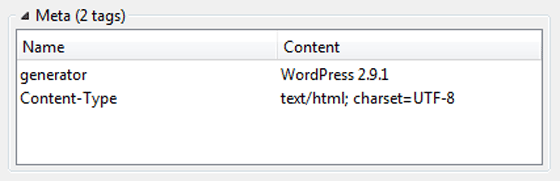
The bad thing about leaving the tags there is that, any potential hacker can easily identify which version you are using. From another angle, if someone manages to find a security glitch in any WordPress version, he would be able to search for all blogs using that particular version.
One way that used to work was by deleting the tag from the theme. Open up header.php and remove this line:
<meta name="generator" content="WordPress <?php bloginfo('version'); ?>" />
I have found that removing this doesn’t fix this often. One sure shot way that always work is using functions.php to add a little code:
<?php remove_action('wp_head', 'wp_generator'); ?>
If you do not have a functions.php in your theme, make one. Make sure this line is above all the code in the file. I am yet to see a case where this fails.
You could use this plugin instead.
Well, hackers are smart people, removing this tag wont make your site super secure, but it would be a little step. Another step would be renaming the default user-name admin to something else, here are three ways to do it.
Related: 13 Tags to Remove from your WordPress Theme

I am a WordPress product developer and creator of Image Attributes Pro. I am passionate about solving problems and travelling the world.





Seems to be an security issue. Thanks for sharing
Its not a major fix, but a minor one, hackers are way better 😉