
Last week, I had written how you could greet your first time commentators with a simple tweak. Here is another tweak with which you can remove your (admin) name from the Recent Comments list. And this time again, no plugins involved 🙂
I guess you are a bit confused on what we are going to do, the following images will explain.
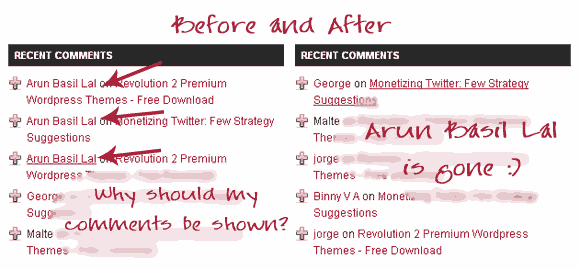
Recent Comments: Before and After
Out-of-the-box: I saw the top commentator widgets on some blogs showing the author himself as the top commentator. There is an option to remove you from the list in the options of the Top Commentator Widget itself. Please write your name in that widget and get yourself removed.
Moving out of Recent Comments
This time again, we exploit the real meaning of open source Content Management System, we edit the WordPress Core. Follow the steps. Written for WordPress 2.7.1, steps must be similar in future versions too.
Find the file widgets.php in wp-includes folder.
Download the file and backup a copy, just in case.
Open the widgets.php in your favorite code editor. Notepad++ is my favorite.
Go to Line 1393 to find
$comments = $wpdb->get_results("SELECT * FROM $wpdb->comments WHERE comment_approved = '1' ORDER BY comment_date_gmt DESC LIMIT $number");
Add a condition which delimits the fetch query from fetching a particular name. The code will look like:
$comments = $wpdb->get_results("SELECT * FROM $wpdb->comments WHERE comment_approved = '1' AND comment_author != 'YOUR-NAME-HERE' ORDER BY comment_date_gmt DESC LIMIT $number");
Replace YOUR-NAME-HERE with the display name of the admin. I used Arun Basil Lal.
Upload the file to the server, overwriting the old widgets.php file. That’s it.
Known Issues:
When a new WordPress Update comes it might replace the widgets.php file with a new version. Then you will have to repeat this again.
Update: In WordPress 2.8.1 the target file is default-widgets.php in the same folder as widgets.php.

I am a WordPress product developer and creator of Image Attributes Pro. I am passionate about solving problems and travelling the world.





Good post. Now more wordpress users will be benefited by this one. Good thinking.
I was thinking of implementing this for a long time, this afternoon was the opportune moment! Hope the folks find it useful 🙂
Cheers
Thanks for the tip Arun! I’ll be implementing this tonight!
Make sure that you keep track of the updates you have made. Will have to repeat this with the next WordPress update 🙁
Arun,
A good tweak,If the author of this plugin follow your line of thinking.This could have come as an option in plug in setting.Even I am planning to do the same very soon.
Actually it comes with WordPress, yes, the coders at wordpress should have thought of this 🙂
Great Post.but an experienced WordPress user will never try to touch the core files of WordPress.you can use any other advanced recent comments plugins out there.
“But wordpress don’t update widgets.php with every update so you won’t have to repeat this every time”
Please refer this page link is modified.
But people who love to handle code, like ex-programmers or core php freaks love to do it the code way rather than a plugin way. Ofcourse a plugin makes it lot easier, but where is all the fun?
Thanks for that link, I had never noticed that. Kudos 🙂
I have a number of websites and blogs, and I use WordPress for one of my blogs. WordPress is quickly becoming my blog management of choice, but it is more complicated to use (if you incorporate your own domain) than it is with other systems – Blogger, for example. That’s why I appreciate technology efficient bloggers like yourself who have the ability to give WordPress users detailed instructions on how to tweak their blogs. When you go into the WordPress core, that can be a scary thing. I hesitate to do it. However, if we have a technology efficient blogger giving us correct instructions on how to tweak – we can feel safer. I don’t know that I will need to put this particular WordPress tip into play. I’m satisfied with things right now. But thanks!
IMHO, WordPress is not complicated. It is powerful and looks good, but its half as complicated as Blogger. Since Blogger is not opensource, the only thing that you get to play with is the code of the template. And there is a drag-and-drop layout editor for that, I guess thats what makes people think Blogger is simple.
Trust me, you will fall addict to wordpress soon!
Thanks for the good words,
Welcome!
This is great but i would like you to use author id instead of author name because, there might be case where you might have a guy with same name.
I know it is hard to find arun basil lal. but for ex: in my blog i use nihar as the name (without sirname).
Good thinking, I will look into this and keep you posted soon!
Thanks for the heads up, you are rocking 🙂
Good tip Arun 🙂 I also wanted to implement this for a long time, but my laziness got better of me each time.
But these days i do not want to do this because, my comments as the admin might be what some people expect on a post as a reply to their query or something…not seeing it in the regular stream might piss them off sometimes 🙂
Anand,
You have a point there. Actually I am using that to my advantage. I can stay invisible by removing my comments from the stream (evil me 😉 )
Moreover, if a commentator is expecting a reply, he would have already subscribed to future comments for the post. But as you said, some might assume that the admin never replies to comments at the first sight 🙁
Cheers 🙂
Nice one ! Gonna remove admin from mine too ! 🙂
make sure that you make a not of it, so that the next time wordpress updates, you wil still know what all to do.. 🙂
Sure..! ..
But @ first I thought it was a plugin’s work ! ..
But the coding is useful !..
thanks Arun … setelah saya coba, kode tersebut berjalan dengan sangat baik … saya menambahkannya pada artikel yang kebetulan mengenai cara menambahkan recent comment di blog saya …
I’m sorry … i can’t english 🙂
Google Translator cannot translate Malay to English, anyway I think its something good. Thanks for that anyway 🙂
Thanks you very much.
Recently I saw your name in Recent Comments ?
Any intention ? SEO ?
Remember? it was a hack in the WordPress core. after the upgrade to 2.8 I havent changed it yet.. Am waiting for 2.8.1 to come out. Will change it once its here 🙂
if u use 2.8, find that in comments.php
Ya, I have moved to 2.8, haven’t tweaked it yet, waiting for 2.8.1 to roll out. Thanks for the heads up 🙂
Hey, in WP 2.8.1 (and WP 2.8) the file to be edited is default-widgets.php, not comment.php.
I just did that 🙂
Thanks you very much.