
WordPress is not build for pages, its more for the posts. Page Management is not very smooth yet.
This can be critical if you try building a static Website with WordPress with lots of pages in it. Setting the page order and managing parent and sub pages can be very (very) (very) confusing.
Here is a plugin that makes life so much easier.
WordPress Page Management with pageMash
pageMash is a simple and cool WordPress plugin that makes managing pages very easy. Once installed, the plugin add a menu item pageMash under the Pages on the left sidebar of WordPress admin.
The interface looks like:
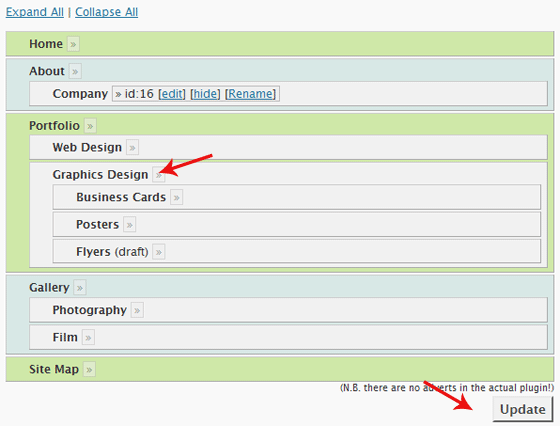
pageMash Demo - Make a Note of the Red Arrows, Click for Live Demo
The pages are listed here according to their Page Order. so if you list pages somewhere on the blog using wp_list_pages the pages would appear in the exact same order.
To move a page up or down, just drag and drop it there. A parent page can be made a sub-page of any other page by dropping it over to the second page. Simple as that.
You will love this plugin, give it a good rating!
Download pageMash | Live Demo of the Plugin
wp_list_pageswp_list_pages
I am a WordPress product developer and creator of Image Attributes Pro. I am passionate about solving problems and travelling the world.





Hmm, I would probably not need it once I completely shift to thesis. You can drag drop and even change the name of the page with out actually changing the name 🙂
Most users wont need this plugin, but it becomes inevitable when you have lots of pages. Recently worked on a blog that had over 100 pages. Found this on the way 🙂
Thanks Arun, this looks like a really useful plugin with a clear need and I’ll be trying it out.
You are welcome, Alex 🙂
A great alternative: http://codecanyon.net/item/reorder-reorder-posts-and-pages/112877
Disclaimer: I’m the developer
Yet another alternative is CMS Tree Page View, which let you drag andr drop to reorder your pages, but also create new pages and search for pages:
http://wordpress.org/extend/plugins/cms-tree-page-view/
I’ve also got a disclaimer 🙂
I’m the developer of this plugin