
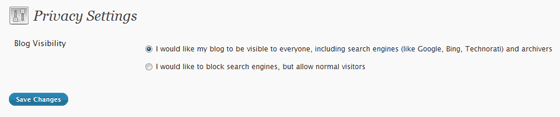
When you install WordPress using the Fantastico Installer, the privacy settings block search Engines by default. I like this feature because it won’t allow Google to index your blog, which is good before your blog is ready.
It has come to my notice that, some people including, but not limited to Todd, forgets to change their privacy setting and hence, their blog seldom gets indexed, no matter how they try.
I wonder why some don’t even check all the settings pages on their blog at least once.
Once your blog is ready to go live, make sure you change the Privacy Settings under Settings on the left side bar > Privacy to: “I would like my blog to be visible to everyone, including search engines (like Google, Bing, Technorati) and archivers”
Get a good spot on Google.

I am a WordPress product developer and creator of Image Attributes Pro. I am passionate about solving problems and travelling the world.





most hosting companies now do not support fantastico because its hackable…i think these days something called “simple scripts” is what most companies use.
My HostGator hosting still comes with Fantastico.
Most hosting providers with cPanel have Fantastico installed. Sadly, Fantastico doesn’t update its script collection along with the release of a new version. The latest version of WordPress that you can install from Fantastico now is 2.8.6 when we use 2.9.2. 🙁 Manual installation is far better.
Install WordPress via Fantastico, then upgrate using automatic upgrade. Thats easier than uploading files manually, rt? Works that way here 🙂
LOL then I’m shooting a mail to the Fantastico dev team to lower its version to 2.7 and keep it as standard 😛 People can upgrade later, isn’t it? 😛
@joseph – LOL, many wont upgrade, they will stay with WP 2.7 forever and miss all the cool features 😉
WordPress 3.0 will come with a option which will keep you notified on Dashboard that your privacy settings are off, so that you can know whether your blog’s indexing is off or on.
That will help the lazy. Great 🙂
Thanks for letting me know. I am going to check my privacy settings on a couple of my niche blogs now!
I don’t you missed it, or did you?
Thanks for pointing this out bro! it will help lots of bloggers out there! but i alsways install wordpress manually! 😀
I think am lazy, I go for the automatic 😉
Thanks for dropping in.
Nice catch. Every one should keep this in mind.
Wow! I have to check this one bro, thanks!