
Think of yourself as a Blogger on the move. You are traveling around the world, sometimes you are at Berlin, and then you move to Paris, yet again to New York.
 How cool it would be to add a note to each post that says where you wrote that from? Or maybe you might want to show off your mood, in the mySpace style or insert answers, “What’s on your mind?” or “What are you doing?” with every post.
This can be done using Custom Fields.
Dissection of get_post_meta();
We will use get_post_meta($post_id, $key, $single); for our purpose. It’s a function that’s used to fetch the post meta data.
The code for our use will be:
get_post_meta($post->ID, "note", true);
The post id is the id of the post. It can be any number and the data from the meta of the corresponding post will be used.
In our case, it’s the post that calls the function, use $post->ID. ‘note’ would act as the Custom Field KEY. You can change it to anything you like, and your custom field KEY would be that one.
Insert the following code into any of your post page of your theme file, either single.php or index.php (for StudioPress themes).
< ?php if( get_post_meta($post->ID, "note", true) ): ? >
Posted From: < ?php echo get_post_meta($post->ID, "note", true); ? >
< ?php endif; ? >
The ‘if’ conditions would check if the custom field exists, if it doesn’t exist, nothing will be displayed.
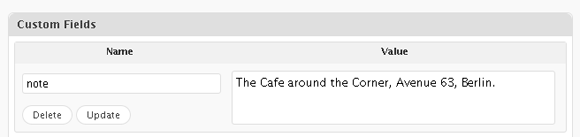
Custom Field for Note
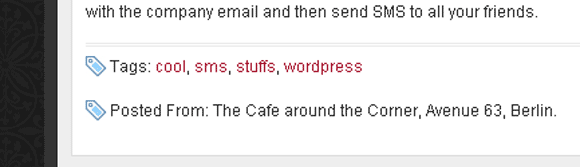
Custom Notes Implemented with some styling on Local Server
Have fun! 🙂

I am a WordPress product developer and creator of Image Attributes Pro. I am passionate about solving problems and travelling the world.





That’s nice, I never thought of this before!
Thanks man!
Woow this is amazing trick to show your mood.
Thanks Arun. 🙂
Welcome 🙂
Great Find Dude.
🙂
I see you are taking up my baton ;-). Waiting for more stuff like this.
Hi hi, I have some plans for the race you just ended, let me complete my lap first 😉
I hope this great idea works for me Arun. Thanks.
It should work, else write in 🙂
I think this feature will give a big boost to travel blogs and Bloggers who are always on the move. The readers will get hooked on to the blogs to find out the next destination. Amusing!
Thanks 🙂
Great tip Arun.
Thanks Nihar 🙂
Say my “KEY” is “worked hours” and the value a number, would I be able to add them up based on categories or tags later?
I’m thinking on applying this for posting tasks on a private blog, each could have a custom field “status” (filed, in progress, on hold , completed) and on completion later on add up a new custom field to the posts for worked hours. But a worked hours “counter” will be nescesary.
What do you think?
The status part could work, the counter, someone would have to manually add that to the custom field. Or better you could use the modified times to get the overall time spent on the post. btw, keys cannot have spaces in between