
This is an open email to Blogger (Google) to tell them that, the crappy comment system of Blogspot is killing the spirits of bloggers.
Have you ever commented on a Blogger (blogspot) blog?
Whoever designed Blogger must have thought that, people on the web had all the time in the world. So they casually created separate comment pages that would either pop-up or load separately when someone choose to comment.
On to that, Blogger blogs do not store your details (Name, email id and website) as cookies. Each time you visit a blogspot blog, you have to type these in again and again.
There is an easy way out, leave without commenting! That’s what most people do 🙁
Just for a comparison (in case you are a google employee), wordpress has a comment box right below the post. Once someone comments on a wordpress, it saves your information as cookies and fetches that when he returns the next time.
A completely filled up comment form is an invitation for the reader to speak out what he has in mind. Type in your comments, click a button and you can go home. (If the blog is AJAX-ed, it doesn’t even cost a pageload)
Can’t Google Fix this?
Though Google acquired Blogger in 2003 (which gave hope that they would improve Blogger), it wasn’t until the may of 2008, that they came with a commenting system with the comment box below the post. Still, the comment box is nowhere close to a solution; we have to enter the details each time. (If you are still on the old system, Amanda of Blogger Buster has a tutorial on adding the comments below your post)
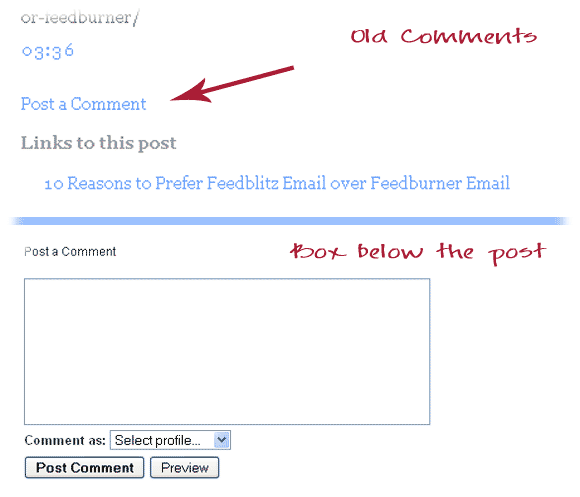
Evolution of Blogger Comments
Dear Blogger,
Please fix the comment boxes. If you can’t find a good coder to do that, do tell me. I know someone who can do that for you! Comments inspire bloggers to write further. Newbie bloggers on WordPress are getting much more comments that blogspot bloggers. Save the bloggers!
Mean while, if you are ready to sacrifice your existing comments to have a WordPress-like comment system, this tutorial from Simple Think will help you install the Intense Debate Comment box. Your old comments will still remain, but it won’t be visible. (A detailed guide is also available from Amanda on installing Intense Debate)
P.S: If you are yet to start a blog, do it at wordpress.com or get a self hosted blog at wordpress.org.

I am a WordPress product developer and creator of Image Attributes Pro. I am passionate about solving problems and travelling the world.





Well said, this is something that has worried me for a while as well. Somehow these blogs just look as if they have not been completed. It looks as if the entire idea of commenting was only added on after wards.
Hey, Thanks for dropping by 🙂
Yeah, the absense of Comment boxes make it look incomplete. Since Blogger was among the first Blogging platforms, maybe the idea of comments developed later on. Thats a possible explanation. But when Google bought Blogger, they could have fixed the issue. Too bad that they are not doing anything 🙁
I am glad that I moved on to WordPress! We are lucky to have such a cool platform to blog on 🙂
Its good to see you here Lyndi .As you do on Nice 2 All, I have the same comment policy; I reply to all my comments 🙂
Cheers…
Amen to that. Blogger has a very bad commenting system. WordPress – very easy. Blogger – convoluted and complicated. Why don’t they make it easier?
Yes man, We have to spend at least 2 minutes to fill up all the fields and stuffs. plus the time taken to write the comment, which cannot the avoided ofcourse. In Worpdress, it takes only the time taken to write the comment. So people tend to leave more comments I think.
btw, When I said “I know someone who can do that for you” in the post, I was thinking of you 🙂
Well Said. 😉
The default comment system of Blogger is one of the reason why I switched to WordPress. Even the Beta or the Draft Blogger didn’t do that much change like WordPress ! What happened to Google ! 🙁
Like Arun said, Get a Blog at wordpress.com or get a self hosted blog at wordpress.org
Better Be Safe(WordPress) than Sorry(Blogger) ! 😉
Yeah, Google seems to be very slow in turning things out, when they acquire something, we usually think that something is going to change all of a sudden. But usually changes comeup only after 4 or 5 years 🙁
It was a great decision to move to WordPress, WordPress rocks 😉
Well, I think all you guys are not aware of the changes that Google made to blogspot. It already introduced the ’embedded comment form’ to the blogspot blogs way back in october 2008. It has to be enabled from the settings though. Once you enable you get the said ‘comment form below post’.
Source: link
It’s just that bloggers are not aware.
Siraj,
Actually it was introduced in June 2008, I was on blogger beta at that time. I have discussed that in the post along and links to relevanat pages are already there. I think you missed that part 😉
Even though you have a comment box below, you have to manually enter your details every time..right? It doesnt store cookies 🙁
Cheers…
What? You need the help of cookies to enter your name and URL?
Anyway, since you’ve said that, I’ve tried commenting and found that cookies were active and my URL and name were saved on that site. So it’s gotta do with the browser rather than Blogger.
I always use Firefox, which saves everything. But I have never seen a blogger blog storing anything. Its the website that choose the store cookies rather than the browser. The browser stores the informtaion and comes down as a drop down when you type one character.
Its not that we need cookies, when people see the comment boxes filled up, the chances that they leave a comment is more.. What say..?
You are absolutely right. I don’t comment on most of the blogspot blogs.
Yeah, see you took just seconds to leave this comment, but commenting on blogspot blogs would take years 🙂 We are lucky to be on wordpress
Aren’t they just over on safety?
Anyway, 3 clicks isn’t so hard to do.
Though 3 clicks arent hard, people wouldnt take even that pain. I dont think you have to be that cautious with your comments, afterall there are good anti-spam solutions 🙂
Thanks for dropping by… Cheers..
I find many blogspot blogs difficult to leave comments on however there are other platforms that are equally as tiresome. Injader comes to mind as does Typepad. Both of those seem to make you jump through hoops to leave your comments. I don’t want to join sites nor do I want to have to try to read the captcha images over and over again.
As for remembering my information, it seems that FF does that automatically as it tries to fill in the blanks for me with the typing of one letter.
The people who designed those commenting systems never studies the browsing habits of an average netizen I guess. Jumping through loops is time consuming and painful 🙁
Yeah, FF helps a lot, atleast it helps us in Jumping the loops, but the real joy of commenting is at wordpress 🙂
Thanks for dropping by.. Good to see you here.. 🙂
Injader’s commenting system has improved. The CAPTCHA is not a requirement and is disabled by default, and it uses cookies to remember your name, email and URL. I’ll admit, it wasn’t always easy to use, but the main thing is that it is now very easy to use. 🙂
Finally Blogger blogs are gonna have a new life, good for them 🙂
You think that Blogger blogs would be well-advised to move to Injader? 🙂 There isn’t a way to import Blogger posts and comments yet, but perhaps there will be at some point in the future.
Right you are right. Blogger is along way back. Could you please mail me who is that friend whom you mentioned that can help in coding. Thanks.
Lol, the coding has to be done in the blogger software, not on your site. You can try the links I have included or @Sriraj mentioned to install Intense Debate. The coder I know is @Binny, he is a professional programmer and a freelancer.
Thanks friend. The Only Thing i wanted was i need to know who should be that coder.And u told me. 🙂 🙂
You should see his profile sometime. he has written a lot of wordpress plugins. One of his plugins called Eventr is used for BarCampKerala Registration procedure, Thanks Binny.
Oops, thats a whole lot of links, sorry for that 😉
> Oops, thats a whole lot of links, sorry for that 😉
Since most of the links are pointing to my sites, I am very happy that you put in many links 😀
Hey!
The links look very disordered when it reaches the inbox, Amal has subscibed to the thread so his inbox should be looking like a jungle of code.
Am sure that he would be glad to see you reply to this one 🙂
Cheers man, the eventr plugin rocks
(Else Aravind would still have to update the list manually and without the spam check, I would still have to delete the spammers one by one. That saved lots of time)
I can’t leave comments at all on Blogger blogs! It’s terribly frustrating. Any ideas why?? 🙁
You cant leave comments? No idea. Is it like a ban or something..?
Please give me an example, I will find an answer 🙂
I can`t add comments on Blogspot blogs. I tried to in able cookies and it still doesn’t`t work. I use Firefox. Can someone please help me?
thanks=
like your post , one of the best i read this week. will visit your site again for sure 🙂
Thank you, so good to hear 🙂
like this one Arun. nice to read on your blog.
I totally agree with you! I think I will have to look for a comment box widget elsewhere because the one in Blogger sucks. You cannot even reply to comments 🙁
Nice post instead of intense debate. I am using disqus on my blogspot site. Trickspagal.com Can plz suggest which will be better among them. Should I change it to intense debate..
I think Disqus is quite good. Stick with it?