
How good are you at Google? Are you acquainted with popular tools other than the basic search? Here are ten simple tests to evaluate how much of the internet have you seen.
These questions were given to me in competition as part of Qbit, a technical fest at my college. You can use anything online to find the answers.
How much of the internet have you seen?

Test #1
Q: On the desktop, create the following:
a. Three folders with the same name xyz
b. A folder with no name.
S: First, answer for the second question
b. Google Helped here:
Create a new folder
Select the folder and right click and select Rename
give ALT+0160 ( type 0160 with ALT tab pressed)The Reason : ALT+0160 will create hexa decimal value. Hexadecimal value for 0160 will be null.
Source
Use the Keypad on the right, it did not work when I tried with the other set of numbers. Or Use the On-Screen Keyboard (Run > osk).
a. Create a folder with the name ‘xyz’. For the second folder use xyz and add the ALT + 0160. Now an invisible character will be added but the name will still appear as xyz.
The third time, name xyz and add the invisible character twice. Now you have three folders with the same name!
Test #2
Q: Suppose you want to find out the number of hits to a site say ‘www.qbit09.com’ and from where these hits are coming from. Also the web browser they used for viewing the site. Generate the necessary code that is to be included in the source code for that purpose.
S: That’s easy. We are talking about Google Analytics. Sign up for Google Analytics, submit any site and they will give you the script, nice and clean.
Test #3
Q: Generate the following image on your web browser
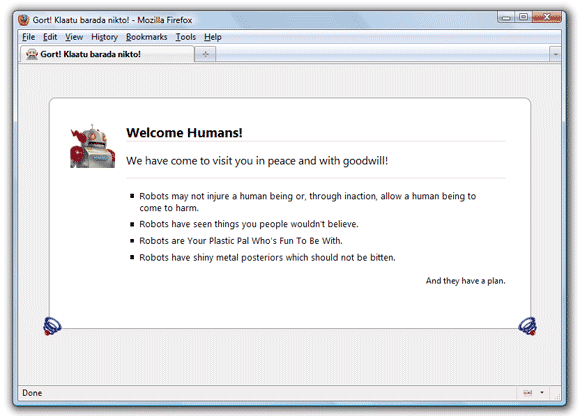
S: This is a Firefox Easter egg. Type in ‘about:robots’ without quotes to the address bar and see what happens. There will be a ‘Try Again’ button towards the left corner of the message. Press it and it will read ‘Please do not press this button again’. Press it again and the button will disappear.
Gort!-Klaatu-barada-nikto!
The phrase “Klaatu barada nikto” originates from the 1951 Cold-War-era science fiction film The Day the Earth Stood Still. The phrase “Gort! Klaatu barada nikto!” was used to stop Gort, the robot in the film, from destroying the Earth.
Source
Try ‘about:mozilla’ now. That’s another one.
Test #4
Q: Obtain the number of times the name of the sports person ‘Tigerwoods’ has been searched in the net over the last month (last 30 days) with graphical details.
S: There are many tools that gives detailed reports, but not many shows graphical details. Google Trends shows a graph, but then ‘Tigerwoods’ is not a very popular term, Trends didn’t have enough data.
Bing’s xRank is the solution.
Test #5
Q: Find the results for what Barrack Obama said about the issue ‘Recession in USA’ and what did John McCain say counter to that.
S: Google In Quotes, a Google Labs product finds quotes from stories in Google News. It can be used to compare what two people said over the same issue.
Test #6
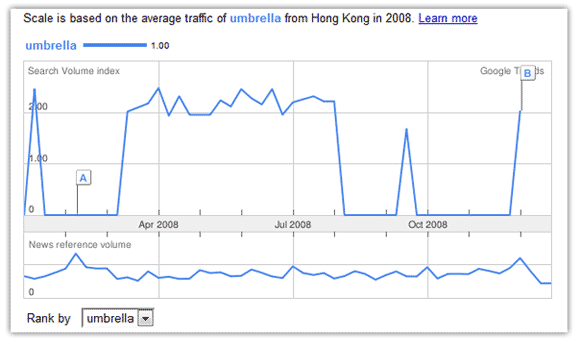
Q: Obtain statistical information about the sale of ‘umbrella’ in Hong-Kong during the year 2008.
S: Google Trends is of use here:
Test #7
Q: Elimine la carpeta llamada “eliminar” en el escritorio
S: First use Google Translator (Detect Language > English) to decipher it out. It means “Delete the folder named ‘delete’ on desktop”
The folder was on the laptop they gave me. It contained two folders con and lpt1. These folders can only be created and deleted using the command prompt. First delete the two folders inside delete using command prompt.
The same applies to:
CON, PRN, AUX, CLOCK$, NUL, COM1, COM2, COM3, COM4, COM5, COM6, COM7, COM8, COM9, LPT1, LPT2, LPT3, LPT4, LPT5, LPT6, LPT7, LPT8, and LPT9.
Here is the how to create and delete folders with these names.
Test #8
Q: Find the share price value of BHARATHI AIRTEL on 14th March 2008 and 2nd November 2007. Display accurate results.
S: I have seen my dad using moneycontrol.com to keep track of stock prices of the Indian market. But soon I found that Money Control did not have the history of prices.
Thankfully, Yahoo Finance had.
Test #9
Q: Display the search queries for which Google has displayed the blog ‘edugurijis.blogspot.com’. Download the table containing the percentage of impressions for those search queries.
S: The solution lies with Google Webmasters Tools. The username and password for the specified blog was given upon request. Webmasters Tools shows the Top Search Queries and a table can be downloaded easily.
Test #10
Q: Download a software to load the new Orkut scraps on your desktop.
S: I googled and found a post on Mashable that reads “20+ Orkut Apps“. Wow! I had 20 to choose from, I selected Orkut Cute, a desktop client for Orkut.
The judges had some other application in mind and I had trouble downloading there. Finally I had to convince them by telling them how big a brand Mashable is.
During the course of the event, I used Twitter Search, Digg Search and Su.pr. I missed my browser bookmarks, I have some really cool search tools bookmarked. If you have any alternate tools for any of the above tasks, please advice, thanks.
I had teamed up with Sreejith and we rolled out as winners. YAY

I am a WordPress product developer and creator of Image Attributes Pro. I am passionate about solving problems and travelling the world.





Awesome! Some are new and some are time tested ones.
Thanks bro, Good to see you again.
Really useful tips.
Thanks for the compliment Jagan!
Nice post!!!!!!!!
I tried to find de solution in Google..
Guess what dis very post came on de top of Google results
wow, sometimes SEO works, sometimes it doesnt, I should probably make a note of this 🙂
I was wondering, why did you search in the first place? Tried to take a mock test?
This is kewl 🙂 i knew that mozilla robots thingy.. rest i had to think a LOT.
It took about an hour when I did it at the competition, am no better. It would have been easier if I had my own browser.
(And I didnt know that robots thing, I google it out 😉 )
I know 2 answers already ! Hurray ! 😀
And, I’m currently killing my time, cracking this code (from Google) !
http://www.techcrunch.com/2009/09/21/google-is-searching-for-beautiful-minds-but-so-far-no-m-i-t-students-have-broken-its-code/
Have a look, and of course, all the best ! 8)
Good luck, Code always scares me off, not my piece of bread (for now 😉 )
I like this Arun.
Thanks!
You are welcome poch, thanks for dropping in 🙂
gud post…!!
Thanks!
Thanks and Very useful post. That Test #4 is the one i really enjoyed. That will help in going with a small research with searched keywords.
Xrank, I didnt remember it during the contest, I got only partial output for that one.
Very nice test. I didn’t know the first ones
Same here, but Google helped as always!
Arun, thanks for the post.
My pleasure 🙂
Very unique post thambi. Looks like Google is synonymous to the internet (just like people say ‘Colgate’ when they actually mean toothpaste). So much of Google 🙂
Lol, a poster outside the contest said, Google Hunt. You said it right, I thought the same when I saw that.
But many were using other specialized search engines, but always Google wins. I used purely Google 🙂
You may have consumed a lot of time to create this post, haven’t you ?
Anyway, it’s worth that time ! 🙂
Not a lot, I usually take the same kind of time for all the posts. I had the questions ready from the contest, so some 2 hours, say.
Thanks for dropping in.
Some very new Ideas! I think I should make a technology quiz out of this..I hope you don’t mind..
Not at all, always a pleasure – Green Signal 🙂
Nice list buddy..Happy that i was able to answer few of them 🙂
I couldnt answer it all without Google, we were allowed to use Google search, so everything went easy
thanks for all admin
very good
benten oyun
Thanks ben!
Nice info dude…keep posting.
thanks, Actually won some bucks for the event 🙂
I thought I was good at Google until I read this – Now I realise there is plenty I don’t know. Thanks for opening my eyes, I’m off to experiment
Oh boy, Google is a mystery, am learning every day, there are more operators in Google than thats published as public in their forums.
I could answer only 3 question. Rest of all were mystery to me. Really nice post.
Cool and Thanks 🙂